

Salesforce security best practices start with the basics: enforce multi-factor authentication, apply least privilege permissions, run a Salesforce Health Check, monitor user activity, secure connected apps and review Experience Cloud access.
All intuitive steps, but those steps are not enough on their own.
A mature Salesforce security programme also needs to protect the content moving through the platform. That is the part many organisations miss.
If you’re lacking security on content like: Files, links, uploads, customer documents, partner submissions, Chatter posts, and Salesforce emails.
Can you really say that you’re following security best practices?
The content entering Salesforce is not automatically safe. A file can contain malware. A link can send users to a phishing page. A document can expose PII, PHI, payment data or confidential information.
That is why organisations should consider bowbridge Anti-Virus for Salesforce as part of their wider Salesforce security strategy. It helps protect the files, URLs and sensitive data moving through Salesforce workflows, while supporting the same content security approach bowbridge customers already trust across critical enterprise applications.
The best Salesforce security strategy protects access, data, applications and content together. Here’s our best practices checklist, including content security, to help keep your data secure. 
Salesforce security best practices checklist
| Checklist item | Why it matters |
| 1. Enforce multi-factor authentication | Adds an extra layer of protection against unauthorised access, even if login details are compromised. |
| 2. Run Salesforce Health Check regularly | Helps identify configuration risks and security settings that need improvement. |
| 3. Apply least privilege permissions | Limits users to the access they actually need, reducing the risk of accidental or malicious exposure. |
| 4. Use Salesforce Shield where appropriate | Adds advanced monitoring, encryption and audit capabilities for organisations with higher security or compliance needs. |
| 5. Monitor logins, events and user behaviour | Helps spot unusual activity, suspicious access patterns or potential account compromise. |
| 6. Secure connected apps and OAuth access | Reduces risk from third-party integrations and apps with unnecessary or excessive permissions. |
| 7. Lock down Experience Cloud and guest user access | Protects public-facing portals and external user journeys from unnecessary data exposure. |
| 8. Train users to recognise phishing and report concerns | Helps users identify suspicious links, attachments and requests before they create risk. |
| 9. Protect files, URLs and sensitive data moving through Salesforce | Closes content security gaps across uploads, links, documents, records and workflows. |
| 10. Install a dedicated content security service for Salesforce | Adds application-specific protection for files, URLs, DLP, quarantine, policies and reporting. |
The rest of this guide explains each step in more detail, with a focus on the content security gap that can sit between traditional Salesforce controls and real-world workflow risk.
Why Salesforce security best practices are important
Salesforce often contains some of an organisation’s most valuable data: customer records, commercial information, contracts, support cases, partner communications and sensitive documents. For regulated sectors, it may also process financial data, patient data, payment information or other protected records.
The cost of a breach is significant. IBM’s 2025 Cost of a Data Breach Report found the global average cost of a data breach was USD 4.44 million, while the average cost for US organisations reached USD 10.22 million.
Cyber incidents are also common. The UK government’s Cyber Security Breaches Survey 2025 found that 43% of UK businesses identified a cyber breach or attack in the previous year, equating to around 612,000 businesses. Medium and large organisations saw higher prevalence, at 67% and 74% respectively.
That's a percentage that has been trending up since 2021, too, as this graph below shows. More and more businesses are facing the threat of a security breach.
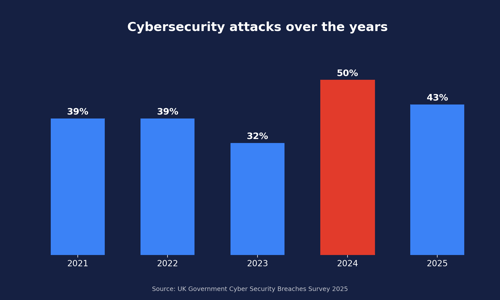
Cyber incidents remain a persistent business risk, and security teams cannot rely on platform trust alone.
The financial costs of a breach can be massive. Here are the best practices to avoid that.
1. Enforce multi-factor authentication
Multi-factor authentication is one of the most important Salesforce security controls. Passwords can be reused, phished or stolen. MFA adds a second verification step, reducing the chance that compromised credentials alone can give an attacker access.
For Salesforce admins, MFA should be enforced for direct logins and aligned with your identity provider if you use SSO. Review users, profiles, permission sets and high-risk roles to confirm that MFA is consistently applied.
MFA is not a replacement for monitoring or least privilege, but it is a baseline control every Salesforce environment should have.
2. Run Salesforce Health Check regularly
Salesforce Health Check gives admins a clear view of security settings from one place. It compares your org against the Salesforce Baseline Standard or a custom baseline, helping teams identify and fix settings that may increase risk.
Use Health Check as a recurring security task, not a one-time review. Run it after major configuration changes, new integrations, acquisitions, org migrations or releases that alter access patterns.
Health Check is especially useful because it turns configuration into a measurable score. That makes it easier for Salesforce admins, IT and security teams to discuss posture using a shared reference point.
3. Apply least privilege permissions
Least privilege means users should only have access to the data, objects and actions they need to do their job.
In Salesforce, this means reviewing profiles, permission sets, roles, sharing rules, public groups, object permissions, field-level security and record access. Avoid granting broad permissions because they are convenient. Over time, inherited access and temporary exceptions can become permanent risk.
Pay close attention to administrator permissions, API-enabled users, integration users, external users and users with export capabilities.
Least privilege is not just about stopping malicious insiders. It also limits damage if an account is compromised through phishing, credential theft or social engineering.

4. Use Salesforce Shield where appropriate
Salesforce Shield can help organisations add stronger protection, monitoring and governance for sensitive Salesforce environments. Salesforce describes Shield as a trio of tools: Shield Platform Encryption, Event Monitoring and Field Audit Trail.
Shield can be valuable for organisations with strict compliance, monitoring or audit requirements. It can help encrypt sensitive data at rest, track user activity and preserve field history for longer periods.
However, Shield does not remove the need for strong configuration, access governance or content security. Encryption and monitoring help protect and observe data, but they do not automatically inspect every uploaded file, embedded URL or sensitive data pattern inside documents.
5. Monitor logins, events and user behaviour
Salesforce security should include ongoing monitoring. Review login history, unusual login locations, failed login patterns, API activity, permission changes, exports and high-volume access.
Monitoring is especially important for detecting compromised accounts. A user may pass MFA, but still behave unusually after compromise or social engineering.
Security teams should define what “normal” looks like for Salesforce activity, then create alerts for abnormal behaviour. This may include unexpected exports, unusual API calls, sudden access to sensitive records, or activity outside normal hours.
Monitoring should also feed incident response. Logs only create value when teams know how to investigate and act on them.
6. Secure connected apps and OAuth access
Connected apps allow external applications to integrate with Salesforce using protocols such as OAuth and SSO. Salesforce notes that connected apps can be used to integrate service providers with an org and set policies controlling what third-party apps can access.
That flexibility creates risk if connected apps are not governed carefully.
Review which apps are connected, who approved them, what scopes they use and when they were last used. Remove apps that are no longer needed. Restrict access to admin-approved users where possible. Apply session policies and review OAuth tokens.
Connected app security is especially important because integrations can bypass normal user workflows. A weakly governed app can become a quiet route into sensitive data.
7. Lock down Experience Cloud and guest user access
Experience Cloud can be powerful for customers, partners and external users, but external access must be tightly controlled.
Salesforce guidance says Experience Cloud sites help organisations connect with customers and partners, and keeping data secure is a joint effort between the customer and Salesforce.
Guest user access is a particular area to review. Salesforce has warned about risks from misconfigured guest user profiles where excessive permissions can expose data that was not intended to be public.
Review every Experience Cloud site, guest profile, sharing rule, public access setting and self-registration flow. If external users can upload files or submit forms, include those content entry points in your security review.
8. Train users to recognise phishing and report concerns
User training remains a core Salesforce security best practice. Users should know how to recognise phishing emails, suspicious links, unexpected MFA prompts, unusual login requests, fake support calls and suspicious Salesforce-related messages.
Training should also be specific to Salesforce workflows. A suspicious link inside a Chatter post, task, case comment or Salesforce email may feel more trustworthy than a link in an external email inbox. That trust can be exploited.
Salesforce provides a contact route to report vulnerabilities, suspicious emails or inappropriate content to its security team. It says these reports help identify scammers, recognise fraudulent activity trends and improve preventative measures.
Make reporting simple. Users should know exactly where to send suspicious messages, links, files or behaviour.

9. Protect files, URLs and sensitive data moving through Salesforce
This is the security gap many organisations overlook.
Salesforce security often focuses on who can log in, what they can access and what they can change. But Salesforce also handles content: file uploads, Chatter posts, emails, task notes, case attachments, partner submissions, customer portal files and documents containing sensitive data.
That content can carry risk.
An uploaded file might contain malware or ransomware. A URL shared in Chatter might lead to a phishing page. A document attached to a case might include PII, PHI, payment data or confidential records. A file from an external portal might come from an unmanaged device.
Did you know?
Salesforce does not natively provide comprehensive content security for uploaded files, links and sensitive data patterns across everyday workflows.
Salesforce security is a shared responsibility.
Content security should include:
-
Malware scanning for uploads
-
URL filtering for links in workflows
-
DLP for sensitive data inside files
-
Policy actions such as block, quarantine, warn or alert
-
Logs and dashboards for audit visibility
- Reporting for security and compliance teams
This layer is especially important for Service Cloud, Experience Cloud and partner workflows, where content often comes from customers, suppliers, partners or external users.
10. Download a dedicated Salesforce content security service
Native Salesforce tools are essential, but they are not designed to solve every content-level risk.
A dedicated Salesforce content security service can help close the gap by inspecting files, URLs and compromised data before they become trusted workflow content.
Look for a service that is built specifically for Salesforce workflows, not a generic perimeter control. It should understand where content enters the platform: uploads, Chatter, emails, tasks, configured fields, customer portals and partner submissions.
A dedicated solution should also have measures in place to protect agentic AI apps, a rising tool for many businesses, which are susceptible to prompt injections.
It should also give admins control over what happens when risk is found. Blocking everything is not always operationally realistic. Mature content security should support policy-based actions such as block, quarantine, warn, allow or alert, with logs and reporting to show what happened.
How bowbridge helps close the Salesforce content security gap
bowbridge for Salesforce is designed to complement native Salesforce security controls by adding a Salesforce-focused content security layer.
It does not replace MFA, Health Check, Shield, least privilege or monitoring. Those controls remain essential.
bowbridge focuses on the content moving into your Salesforce environment.
bowbridge for Salesforce is designed to scan uploaded files for malware, ransomware, malicious code and suspicious files; check URLs in workflows such as Chatter, Salesforce emails, tasks and configured text fields; and apply actions such as block, quarantine, warn, allow or alert. It also includes dashboards, logs, alerts and reporting to support visibility and audit needs.
In practical terms, that means bowbridge helps teams:
-
Stop unsafe files before users open them
-
Check risky links before users trust them
-
Protect agentic applications from malicious data
-
Apply policy-based controls at the point of entry
-
Give admins evidence that controls are working
This is more than antivirus for Salesforce. It is application-aware content security for the files, links and sensitive data moving through everyday workflows.
Salesforce security must include content security
Salesforce security best practices have evolved.
MFA, permissions, Health Check, Shield, monitoring, connected app governance and Experience Cloud controls remain essential. They protect access, configuration and platform activity.
But modern Salesforce security also needs to protect content.
Files, links and sensitive data move through Salesforce every day. They enter through users, customers, partners, portals, emails, tasks, Chatter posts and integrations. Without content-level controls, unsafe content can become trusted content before anyone knows there is a problem.
The answer is not to slow Salesforce down. The answer is to secure the content moving through it.
Register your interest in bowbridge for Salesforce and learn how bowbridge helps protect Salesforce files, links and sensitive data.
Share this on social: